



Last updated: 4th November 2026
Key takeaways
Many of the delays your branches feel happen in the handoffs around your core banking system. Think of support requests, policy updates, audit actions and onboarding. You can fix each one without touching the core. Give each process a named owner, a time limit and a record you can check. Then measure one thing before and after a small pilot. We’d start with branch support requests. They’re frequent and easy to measure. Claromentis Enablement Hub runs all four workflows in one secure staff hub.

Run your branch workflows from one secure staff hub
One of your tellers finds an exception they can’t clear at the branch. A customer’s change of address hasn’t reached their debit card record, so the replacement card is about to go to the old address.
So the teller emails a shared inbox at head office. The next morning, the branch manager phones operations to ask whether anyone has picked it up. Operations thought the cards team had it. The cards team never saw the email.
Whatever caused the mismatch, the branch now has a second problem: nobody clearly owns the investigation.
That second problem is about people and handoffs. Your core banking platform is very good at what it was built for, which is keeping accounts and transactions straight. It was never meant to decide who picks up a branch query, or to tell the branch when it’s been fixed.
In this article, I’ll walk through 4 banking operations process improvements you can make around the core: branch support requests, policy acknowledgments, audit corrective actions and onboarding for new branch employees. For each one, you’ll see what starts the work, who owns it, what record it leaves and what to measure.
4 banking operations process improvements, with workflow examples
Each of these improvements works on its own, so you can pick the one that causes your branches the most trouble. I’ll work through the first in detail, because the same approach carries over to the other three.
1. Give every branch support request a named owner
If you’re only going to change one process, we’d make it this one.
Branch requests happen every day, so you’ll quickly have enough of them to measure. And when one stalls, it’s usually a customer who ends up waiting.
It’s also a contained place to start. In the 2026 CSBS survey of U.S. community banks, four in ten respondents identified cost or difficulty putting new technology into practice as their bank’s biggest barrier to adoption over the next year. A support queue coordinates the work around an issue without changing any account records. So you can find out whether the approach works before you commit to anything bigger.
Before the pilot, agree four things with your team:
- Request categories. Keep the list short, such as account servicing, cards, equipment and policy questions.
- An owning team for each category. Every category needs a team at head office that accepts its requests.
- An escalation rule. Decide who chases a request that nobody accepts in time.
- What branches may include. For example, whether customer details are allowed in a request, and which ones.
Those decisions belong to your team, but you won’t be making them alone. For Claromentis Enablement Hub, our onboarding team helps you set up the hub and trains your administrators. After that, your administrators can build and adjust the form and workflow themselves, because the tools are no-code: you build by dragging and dropping, without any programming.
An illustrative branch support request workflow
- A branch employee raises the request. They fill in a short form on the staff intranet with their branch, the category, the urgency and a description. They can attach a file if it helps.
- The category decides the owner. Card issues go to the cards team, equipment faults to IT and policy questions to compliance. In Enablement Hub, you’d build this routing in InfoCapture, our no-code business process automation platform, using form conditions rather than code.
- A named person accepts it. The owning team is notified when the request arrives. When someone accepts it, they become the named owner and the status moves from new to in progress. The branch is notified at each change, so it can check progress without calling head office.
- The clock is visible. A service level agreement (SLA) is a time limit you set for a stage. If nobody accepts the request within, say, four hours, InfoCapture flags it as breached, so it stands out in the request list for whoever chases late requests.
- The owner closes it with a note. They record what they did and close the request. If the same issue keeps arriving from different branches, it shows up in your reports and branch dashboards instead of sitting in separate inboxes.
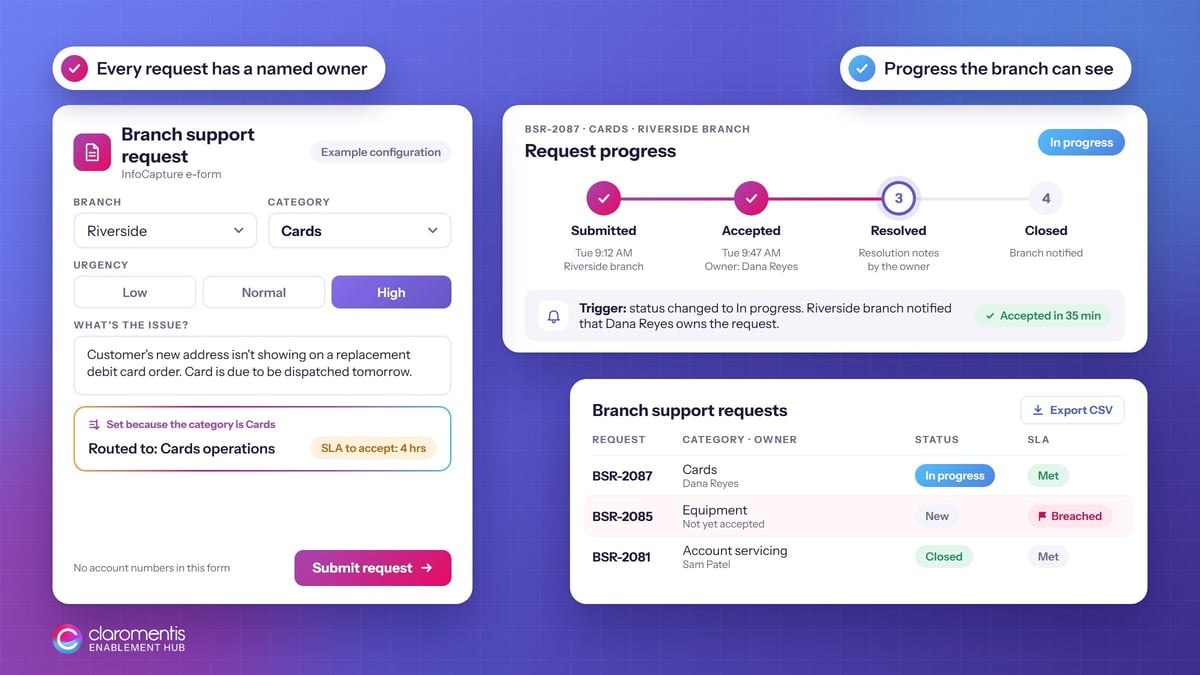
Illustration of an example InfoCapture branch support request configuration. Names, branches and request IDs are fictional.
You end up with one request record that holds the branch, category, named owner, status and resolution notes, in place of the email thread.
How to measure it
Define assignment as the moment a named person accepts responsibility for a request. Then measure that same moment before and during the pilot.
- Before the pilot: take a sample of recent requests from the shared inbox, and find the first reply in which someone confirmed they owned the issue.
- During the pilot: use the moment the owner accepts the request in InfoCapture.
Compare the same request categories in both periods, and count business hours only, so a request sent late on a Friday doesn’t skew the result. Then compare the median, which is the middle value, so one request that sat for a week can’t distort the picture. Track SLA breaches and repeat requests for the same issue alongside it.
Lone Star Credit Union, which serves members in eight Texas counties, built a support ticketing system in InfoCapture on its staff intranet. It also keeps its procedures in the Knowledge Base, so office and frontline staff can search for what they need.
2. Turn a policy revision into a targeted acknowledgment
Support requests travel from the branches to head office. Policy changes travel the other way, and they stall in a different place.
Take this example: your compliance team revises the cash-handling procedure after an internal review. Today, the update goes out as an all-staff email with a PDF attached. Some branches read it. But nobody at head office can say who has seen the current version.
- Trigger and owner: the policy owner publishes the revised version, and compliance owns the follow-up.
- How it runs: in Enablement Hub, the revised policy goes into our policy management application, which keeps an archive of earlier versions. You share it with the roles it applies to, such as tellers and branch managers, rather than with everyone. Each person is notified and asked to read and accept it.
- Record produced: a list of who has accepted the current version, and who hasn’t yet.
- What to measure: outstanding acknowledgments by branch, a week after you publish.
An acknowledgment shows that someone read the policy. It doesn’t show they can apply it. So for higher-risk changes, add a short quiz in the learning management system (LMS), or a supervisor check.
3. Close audit findings with a corrective action and evidence
Audit findings follow the same pattern, with one difference: someone will come back and check.
Let's say your internal audit finds gaps on several days in one branch’s vault access log. The finding goes into the audit report, and the corrective action goes into a spreadsheet. The evidence that it was fixed arrives weeks later as an email attachment, if it arrives at all.
- Trigger and owner: internal audit raises the finding. The branch manager owns the corrective action, and audit or compliance checks it.
- How it runs: each finding becomes an action with an owner, a due date and a place for evidence. The owner uploads the evidence, such as a month of completed logs, and submits it. The reviewer then accepts it or sends it back with a comment, and an SLA flags any action that passes its due date. In Enablement Hub, InfoCapture’s Audit Manager handles internal and external audits end to end, and ready-made compliance templates give you a starting point.
- Record produced: the finding, the action, its owner and due date, the evidence and the reviewer’s decision, all in one place.
- What to measure: overdue corrective actions, actions closed without evidence and findings that come back at the next audit.
Aim for zero actions closed without evidence. When the next audit asks how a finding was fixed, that record is your answer.
4. Give new branch employees a role-based onboarding path
The last improvement starts before a new employee’s first day.
Imagine you've got a new teller starting on Monday. Their first-week reading is a list of links in an email, and their required training sits in a separate system. So their manager finds out what’s outstanding by asking them.
- Trigger and owner: HR confirms the start date. The branch manager owns the new hire’s readiness, and learning and development owns the training content.
- How it runs: an onboarding workflow assigns the pre-start tasks, such as system access and a first-day schedule, to the people responsible. The new hire then gets a learning pathway for the teller role in the LMS. It puts the courses they need in order and can draw on your existing policies and Knowledge Base articles. Each stage can unlock the next once it’s complete, and validity dates prompt refresher training later.
- Record produced: course and pathway completions, quiz results and the onboarding tasks marked as done.
- What to measure: required training completed before the first unsupervised shift, onboarding tasks still open at the end of week one and overdue refreshers.
Then add a supervisor sign-off for anything that has to be observed, such as balancing a cash drawer, because a completion record can’t show that.
The four improvements side by side
If you’re choosing where to start, this table puts the four improvements next to each other.
What these workflows don’t replace
Each example runs alongside your core banking system, not inside it. Your core stays the system of record, meaning the official source for accounts and transactions.
Fraud monitoring, credit decisions and regulatory capital calculations belong in the specialist systems built for them. A workflow tool doesn’t do that work. It can, however, manage the staff tasks that follow from it, such as asking a colleague to review a case.
There are also two kinds of self-service, and only one of them belongs here:
- Employee self-service is what these examples cover. Staff raise requests and find procedures without chasing colleagues.
- Customer self-service, such as online account changes or digital loan applications, belongs in your digital banking channels. It needs its own security, identity and consumer protection design.
Where a workflow needs data from another system, InfoCapture can connect to your existing tools, and our development team can build bespoke integrations. Scope that as part of the project, and don’t assume it’ll be in place on day one.
How to choose your first process
So, where should you start? These four steps will get you to a fair pilot.
- Pick the process with the most chasing today. Look for the one where people phone or email to ask who’s dealing with something, and check it has a clear owner.
- Record a baseline before you change anything. Use email timestamps, spreadsheets or whatever records exist now.
- Pilot it with a few branches. Then compare the same measure over a similar period.
- Agree in advance what result would justify extending it. That way, the decision to roll it out to other branches rests on the numbers.
Where Claromentis fits
Claromentis Enablement Hub for Financial Services brings all four workflows into one secure staff hub. Every Enablement Hub package includes the intranet, with policy management, the Knowledge Base and no-code page building. You can add InfoCapture for process automation, the LMS for training, or both.
You can run it as SaaS or on your own infrastructure. Claromentis is ISO 27001:2022 certified, and Enablement Hub supports single sign-on, two-factor authentication and granular permissions. Regulated organizations, including The Central Bank of The Bahamas, use it.
If you’re still making the case for a staff hub, our guide to the benefits of an intranet for financial services covers the business case. If hosting is the deciding question, read how to choose an on-premise intranet for financial institutions. And to see how the pieces fit together for banks and credit unions, explore the Claromentis financial services intranet.
To see a branch request assigned and resolved, bring one of your own requests to a no-obligation demo with one of our experts. We’ll show you the form, the routing and the record it leaves behind.
See a branch request assigned and resolved
Book a demo with one of our experts, or browse the video demo library at your own pace.