

Last updated: 4th November 2026
Key takeaways
A nonprofit intranet saves time on ordinary jobs. Volunteers get ready for a first shift, staff find procedures on a phone, and one site gets its own updates. Your donor CRM and finance system stay where they are. The intranet handles the people, forms, documents and approvals around them. After launch, your own administrators run it, with our onboarding team and support portal behind them.

Give every volunteer one place to get ready
It’s Friday afternoon, and you’ve got three new volunteers starting at your Eastside site tomorrow morning. One of them hasn’t read the safeguarding policy yet, and another is texting you to ask where to park.
Then the site manager forwards an email chain about a change to Saturday’s distribution times. Half the team won’t read it before they arrive.
None of this is fundraising, and none of it is dramatic. But it’s where a surprising amount of your team’s week goes.
A nonprofit intranet gives that work a home. Your staff and volunteers get the procedures, forms, training and updates they need in one secure hub, and they can open it on a phone.
This article covers 3 everyday jobs a nonprofit intranet speeds up, what stays in your fundraising system, who looks after the hub once it’s live, and how to tell whether it’s saving time.
3 everyday jobs a nonprofit intranet makes faster
1. Get a new volunteer ready for their first shift
Plenty of organizations haven’t formalized volunteer onboarding yet. According to Independent Sector’s 2026 research on volunteer management, 48% of U.S. nonprofit organizations in its staffed sample that used volunteers reported having an orientation process; 45% reported having a training process.
Orientation and training often overlap. Keep the first-shift pathway focused on what volunteers need before they start. Then schedule further learning and refreshers around their role.
In Claromentis Charity Hub, a first-shift pathway can work like this:
- The coordinator assigns a pathway for the role. When Maya joins as a pantry volunteer, the coordinator assigns the onboarding pathway for that role: a welcome article, a short food safety course, the safeguarding policy and the Saturday shift checklist. The pathway is built in our learning management system (LMS) from content that’s already on your intranet, so nobody has to rewrite the policy as a course.
- Maya opens the pathway on a phone. It shows exactly what to finish before Saturday: the welcome article, the course, and the safeguarding policy to read and accept.
- The coordinator sees what’s outstanding. The site dashboard shows who’s ready and who still has something to finish. If the safeguarding policy is still waiting, the coordinator finds out before the shift, and the pending policy reminder goes to the one person who needs it.
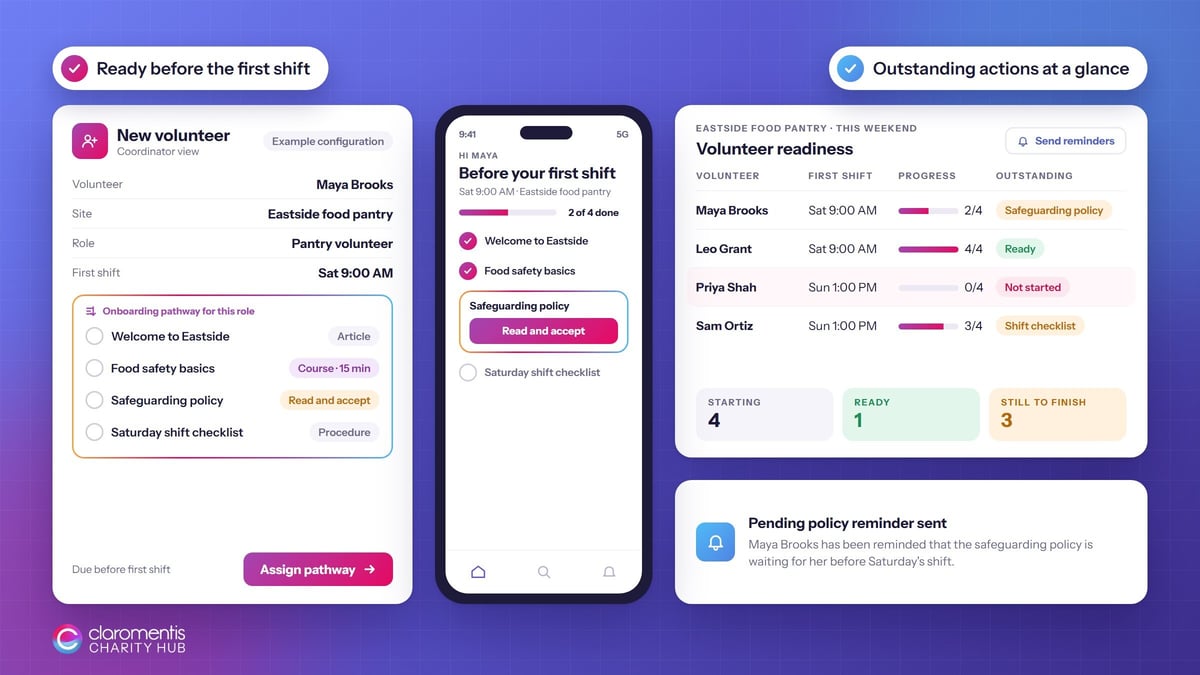
Illustration of an example Charity Hub volunteer onboarding configuration. Names and sites are fictional.
The coordinator stops chasing by text message and knows who’s ready before the shift starts.
Further courses for the role, and refresher dates for training that expires, can then sit in their own pathway.
2. Find the approved procedure from a phone
A support worker is about to head out on a home visit and needs the current safety procedure. It’s somewhere in a shared drive, possibly in three versions, and nobody’s sure which one the program director signed off.
In a nonprofit intranet, procedures live in one version-controlled library, and version control shows staff the latest version of each document. Charity Hub’s AI search lets them type the question the way they’d ask a colleague. It answers only from content on your intranet, and only with what each person has permission to see.
It’s even more useful when most of your people work away from a desk. Dessercom, a nonprofit that runs pre-hospital emergency services across 38 service points in Quebec, has 80% of its staff on the road. The team uses Claromentis to target information to the people and groups who need it, and has gone paperless by moving its processes onto online forms. It also brought its information management in-house, so its own team now updates content as health protocols change instead of relying on an external agency.
3. Send an update to one site without forwarding an email chain
Now take the change to Saturday’s distribution times. It only affects Eastside, but today it goes out as an email to everyone and then gets forwarded twice more.
On an intranet, the site manager publishes the update once, to the Eastside group only. If everyone must see it before their shift, it goes out as an announcement that people have to read and accept. And the Locations application gives each site its own page, with its team directory, procedures and recent updates in one place.
Discussion rooms and project spaces handle the back-and-forth that would otherwise fill the email chain, such as volunteers swapping shifts or a site team planning a food drive. The site manager can also check who has read the update before Saturday arrives.
What belongs in the intranet, and what stays in your fundraising system?
So, will you still need your donor CRM?
Yes. Your fundraising and finance systems stay the systems of record for donors, gifts, payments and accounts, meaning they’re the official source for that data. Donation processing happens there, or in the giving platforms connected to them.
The intranet sits around those systems and coordinates your team’s everyday work. An expense or funding approval can run as a workflow in the intranet, for example, while the payment itself is still recorded in your finance system.
This table shows where each system’s data lives and what it takes to connect it to Charity Hub.
If you’d like fundraising figures to flow into the hub automatically, such as campaign totals on a site dashboard, talk to us about an integration. Our development team scopes it with you, including which data moves, in which direction and what setup it needs. Updates can also reach the Microsoft Teams or Slack channels your team already uses.
Who looks after it after launch?
Your team runs it day to day, with us behind you.
During launch, our onboarding team runs workshops with you to build the hub around your branding and goals. We then train your administrators with a train-the-trainer approach. With our cloud (SaaS) option, hosting, upgrades and support are included, so there are no servers for you to manage.
After launch, administrators without technical expertise can do the following, within the permissions you give them:
- Build and edit pages with drag-and-drop tools, and change menus and layouts.
- Publish news and announcements, including targeted ones for a single site or group.
- Update policies and procedures, with version control keeping earlier versions archived.
- Build forms, workflows and training courses without code, such as a volunteer sign-up form or a new onboarding pathway.
So the person who knows your volunteer program best can update its pages, forms and courses themselves.
When you need help, the Discover customer support portal is open 24/7, wherever your team is. You can raise a ticket, request a change, or work through how-to guides, user guides, training videos and Claromentis University courses. The AI assistant inside your own hub can also draw on Discover, so admins get platform answers without leaving the intranet. Software updates are included too.
You’ll still want IT help for a few jobs:
- Single sign-on and Active Directory sync, which need whoever manages your logins.
- Custom integrations, which our development team builds with your input.
- On-premise hosting, if you choose it, because your IT team then manages the servers, updates and backups.
If you only need to share files and documents, a full hub may be more than you need, and a lighter file-sharing tool could do the job. Charity Hub earns its place when you want onboarding, policies, forms and updates working together.
How to tell whether it’s saving time
Start with time itself. Track how many minutes the coordinator spends chasing each new starter before and after the change.
Then keep an eye on three signs that the hub is doing its job:
- Volunteer onboarding: the share of new volunteers who finish their pathway before their first shift.
- Procedures: the search terms that return no results in your intranet analytics, which show you what staff can’t find.
- Site updates: the share of a site team that has read and accepted an update by the day it applies.
Where you can, record how things work today, such as how many new volunteers arrive without having read the safeguarding policy. That gives you something real to compare against.
Where Claromentis Charity Hub fits
Claromentis Charity Hub brings our intranet, our LMS and InfoCapture, our no-code process automation platform, together in one hub for nonprofits. You can run it in our cloud or on your own servers. Claromentis is ISO 27001:2022 certified, and discounts are available for charities and nonprofits.
To see what’s included, explore the Claromentis charity intranet. If you run several sites and want to compare features before you talk to suppliers, our guide to multi-site nonprofit software covers what to test.
To see how your own volunteer onboarding would look in Charity Hub, book a no-obligation discussion call with one of our experts. Bring one process with you, and we’ll walk through it together.
See a volunteer’s first week in Charity Hub
Book a demo with one of our experts, or browse the video demo library at your own pace.